Digital signage software Malaysia
Your shop TV, changed from your phone.
Menus, promos and prices on the TV you already have.
Start free with one screen · See pricing
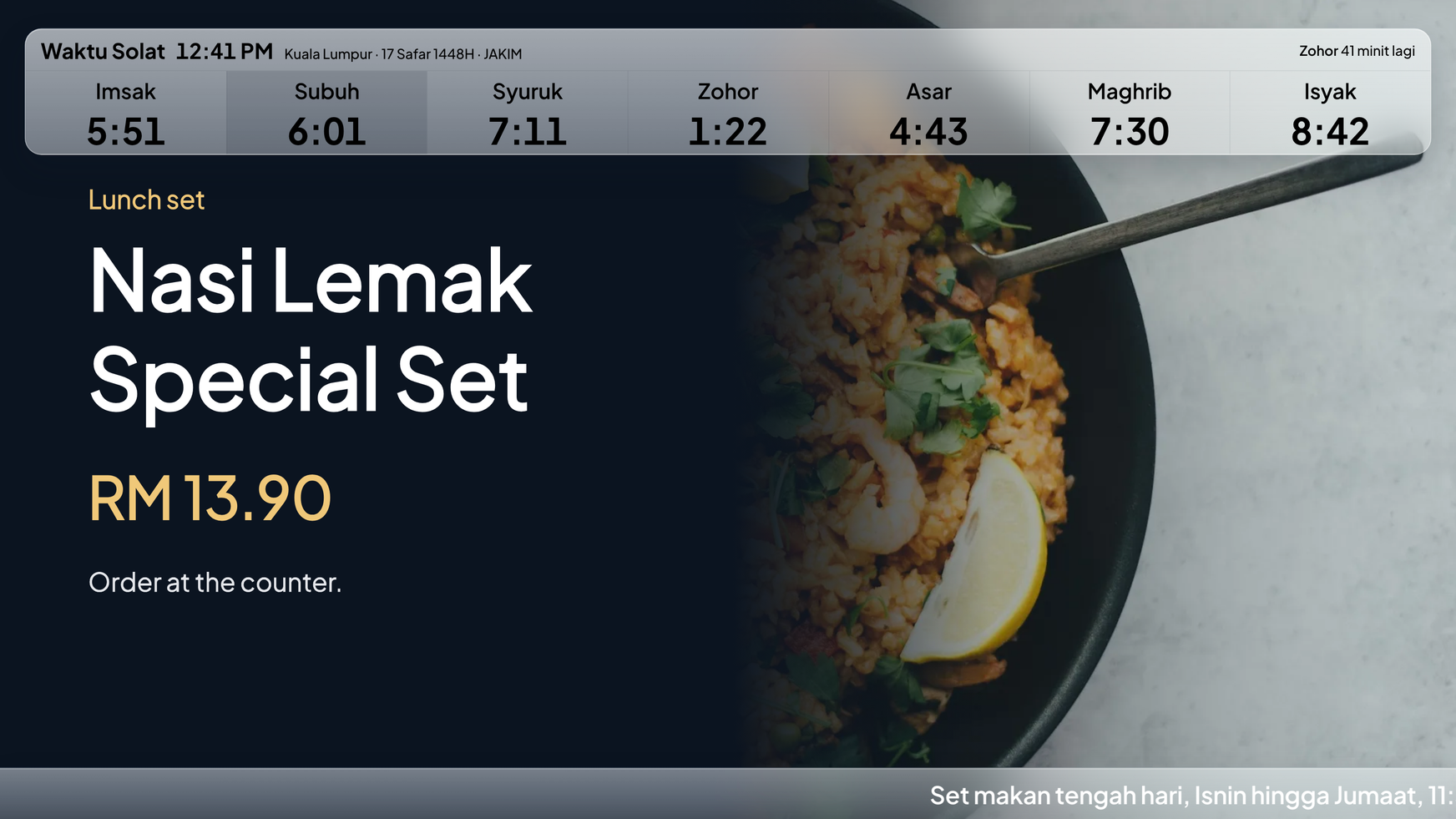
Free for one screen. Paid plans from RM19 a month. No credit card, no contract.
Built in Malaysia · Cancel anytime · WhatsApp support
No more pendrive.
Change it once. Every screen follows.
Today: Walk to the TV with a pendrive. With Layar: Change it on your phone.
Today: The lunch promo is still up at dinner. With Layar: Boards switch on their own.
Today: A customer tells you the screen is off. With Layar: WhatsApp tells you first.
Today: Visit each branch to check. With Layar: Every screen on one page.
Works with the TV you have.
Any TV with HDMI. One small box behind it.
- Sign up free. Build your first board on your laptop. Canva designs or your own photos.
- Connect the TV. A small Android box or Windows PC, paired with a code.
- Publish. The TV changes in seconds, and keeps playing if Wi-Fi drops.
See it for your business: Cafes · Restaurants · Clinics · Gyms · Retail · Salons · Offices
Straightforward.
Built in Malaysia
Ringgit prices. JAKIM prayer times.
A real person on WhatsApp
The people who build Layar.
Month to month
Cancel anytime. Free stays free.
Your content stays yours
Never sold, never shared.
From dashboard to every TV in minutes.
Set it once.
Breakfast, lunch and weekend boards switch on time. A promotion ends on its date by itself. On Starter and up.
Publish. Done.
The new board takes over without the screen going blank, and Layar shows which screens have it.
Know before a customer does.
Black or frozen picture? Layar restarts the screen for you and emails you only if it is still wrong. WhatsApp alerts on Solo and up.
A message on the screen in a minute.
Type it, choose how long, and the screen goes back to its playlist by itself. On every plan.
A now serving number on your TV.
Staff tap Next on their phone and the screen follows. Customers can watch their number on their own phone. On every plan.
A store directory visitors can search.
Floor maps and a store directory for malls, offices and hospitals. Included in Pro when you build it yourself. We can build it for you for a one-time fee.
Every plan price is on this page.
No quote, no setup fee on any plan, no minimum term.
Free: RM0 first screen
One TV. The real thing.
- One TV
- Small Layar mark and a 10s Layar slide
- No credit card, no time limit
Solo: RM19 per month, one screen
One live screen.
- One TV, no mark
- Screen on and off times
- WhatsApp alerts
Starter: RM29 per screen per month
Small teams and branches.
- Up to 10 TVs
- Custom Layout and Split Screen
- Prayer time, weather and QR widgets
- Weekly schedule per screen
Pro: RM59 per screen per month
Reports and control.
- Unlimited TVs
- RM49 each from TV 21, RM39 from TV 51
- Screen groups and bulk changes
- Analytics and play reports
FAQ
What hardware do I need?
Any TV with an HDMI port, plus one small Android box or a Windows PC running the free Layar player. You can build your first screen on your laptop before the box arrives.
Do I need to be technical to use Layar?
No. If you can make a poster in Canva or send a photo on WhatsApp, you can run Layar.
Can I use Canva or poster designs?
Yes. Import your Canva designs, or add your own photos and videos, and Layar turns them into a playlist for the TV.
Does playback continue offline?
Yes. After content is published, the player keeps the latest content locally so screens keep playing during an internet issue.
Can Layar alert me if a screen goes offline?
Yes. Layar emails you on every plan, including Free. Paid plans also get a WhatsApp message. If a screen is on but black or frozen, Layar restarts it first.
How much does it cost?
Your first screen is free forever. Beyond that, Solo is RM19 a month for a single screen, while Starter and Pro charge for every screen you run: RM29 each on Starter, and on Pro RM59 each for the first 20, RM49 for screens 21 to 50 and RM39 from screen 51. All month to month.
Am I locked into a contract?
No. Plans are month to month and you can change or cancel anytime. The free plan stays free with no card required.
Your first screen, today.
Create the account. Add a board. Connect the TV when you are ready.
Start free with one screen · See pricing
Built in Malaysia for Malaysian businesses. Download player · Blog · Wayfinding for malls, offices and hospitals · Queue numbers for clinics and cafes